
I review (and build) a lot of apps. Custom builds, WordPress sites, Laravel projects, CakePHP, CodeIgniter, and the list goes on. Most of the websites and applications I audit have been quietly running since the last time anyone remembered to check them. And one thing comes up constantly.
Slow page loads that nobody can explain.
The client blames the host. The host blames the code. The SEO agency writes a 47-page audit recommending a CDN, image compression, and "reducing render-blocking resources." Everyone points fingers at everything except the actual problem.
In my experience, it's often the database. More specifically, a database with no useful indexes on the columns that matter.
Not always. But often enough that it should be one of the first places people look, not one of the last.
The Speed Conversation Nobody Is Having Correctly
Core Web Vitals have everyone chasing milliseconds and green "100" scores. Images get lazy-loaded. Fonts get preloaded. And after all that effort, the page still takes four seconds to load, and nobody can explain why.
The next "fix" is caching. Here's the honest truth about caching: it often hides the problem.
A cached page loads fast. Someone posts a screenshot with a near-perfect score on LinkedIn. Everybody claps. But the uncached request still exists. The logged-in user still exists. The admin dashboard still exists. The dynamic search page still exists. The report page pulling from six tables still exists.
That's where reality shows up. So here's my screenshot:
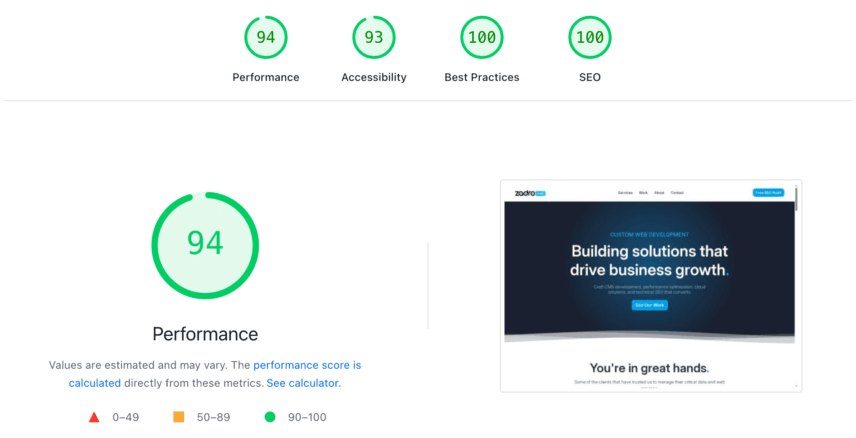
And guess what? I have zero client-side caching. Those scores are purely from a properly tuned database (with some heavy lifting from an optimized Nginx server).
But here's the thing. I'm not saying caching is bad. It isn't. Caching is smart. Necessary, even, for most web hosting setups. But it does not fix a database that has no idea where to look. Caching just masks the issue until the wrong request hits the app.
And a lot of SEOs won't catch this. That's not a dig, it's just reality. Good SEOs understand crawlability, content structure, search intent, internal linking, and schema. Useful skills. But database query optimization is something else. Most "technical SEO" in the wild is still just marketing with a technical costume on.
Most WordPress shops aren't finding the "slow" issue either, as most are webmasters claiming to be devs. There's a difference between knowing WordPress and understanding what's happening under the hood. You need someone comfortable in both worlds, and that's a shorter list than the industry suggests.
That may sound harsh, but unfortunately, it's very accurate.
WordPress and The Indexing Problem Nobody Talks About
WordPress powers a massive share of the web. According to W3Techs, WordPress is used by 42.5% of all websites and 59.8% of websites with a known CMS (as of March 11, 2026). That alone means this problem shows up a lot.
WordPress has a table structure that does not scale especially gracefully once enough plugins, metadata, and custom logic pile on. The main offender is usually wp_postmeta.
WordPress stores all kinds of things there: custom fields, plugin settings, SEO metadata, product attributes, random plugin junk nobody remembers installing. It's flexible. It's convenient. And under pressure, it can turn into a mess. Don't even get me started about the database bloat of RankMath. Let's just say, it's not my favorite SEO plugin, by a mile. Moving on.
On a small site, the DB issues and bad query patterns stay invisible for a long time. On a store with thousands of products and a bunch of active plugins all hammering metadata, your users will feel it, no doubt.
Plugin authors are usually not incentivized to clean up the database bloat. They ship something that works and move on. The technical debt lands on the site owner years later when the database has grown enough to make the problem visible. Good times.
There's a WordPress plugin called Index WP MySQL For Speed by Ollie Jones that addresses this directly. According to the official plugin page, it adds high-performance keys to selected WordPress tables and can also monitor which database operations are slowest.
For many standard WordPress installs, it's a strong first move and sometimes enough on its own. But heavily customized installs are a different story. Custom post types with layered meta queries. Plugins with their own tables. Database query patterns that don't follow WordPress conventions. All that needs someone to read the actual query output and index based on real usage, not wishful thinking.
What is a Database Index?
A database index works like a book index. Without one, the database may have to read row after row to find matching records. With an index, it can jump much closer to the right place immediately. Same data. Less work. Simple.
Without an index on a useful column, MySQL often ends up scanning far more rows than it should. On a table with 10,000 rows, that's annoying. On a table with 500,000 rows, it becomes a real performance problem. And when queries nest inside other queries, or execute once per row of an outer result, the technical waste compounds fast.
I've seen dashboards that looked simple on the surface but were chewing through absurd numbers of row reads on every page load. Not because the code was terrible. Actually, scratch that. Sometimes the code is terrible. But a lot of the time, the bigger issue is that nobody added the few indexes that would have cut the work down dramatically. That's the part people miss.
"The real problem is that programmers have spent far too much time worrying about efficiency in the wrong places and at the wrong times; premature optimization is the root of all evil (or at least most of it) in programming."
Donald Knuth, The Art of Computer Programming
Adding the right index to support an obvious join or filter is not premature optimization. It's maintenance. Basic maintenance.
How to Find the Problem
Most developers don't know the app has this problem until a client complains. By then, it has often been slow for months. The good news is that once you know where to look, the culprit usually shows itself pretty quickly.
Start with the slow query log. Reproduce the slow page. Look at the SQL being run. Then use EXPLAIN. Evidence first. Opinions later.
Below are generalized examples, not copy-paste fixes for every app.
-- Enable slow query logging
SET GLOBAL slow_query_log = 'ON';
SET GLOBAL long_query_time = 0.5;
Find the log location:
SHOW VARIABLES LIKE 'slow_query_log_file';Once the slow query is visible, run EXPLAIN against it:
EXPLAIN
SELECT *
FROM parent_table p
JOIN child_table c ON c.parent_id = p.id
WHERE p.account_id = 42
  AND p.status = 1;
A few columns tell you a lot. The type column shows how MySQL is accessing the table. Then, key shows which index it chose. And, rows estimates how many rows it expects to examine. Lastly, Extra can show things like Using temporary or Using filesort, which often means extra work is happening behind the scenes.
If you see ALL in the type column with NULL in the key column, it's usually a bad sign. Especially inside a subquery running repeatedly. Not subtle. Not mysterious. Just more technical waste.
The Indexing Playbook
There are a few patterns that show up over and over in real applications. These are not edge cases. This is normal app behavior that never got proper database support. Some of these feel obvious in hindsight. Most don't get caught until someone actually runs EXPLAIN and sees the damage.
Foreign Keys and Join Columns
A foreign key or join column that gets used regularly needs an index. Otherwise, the database may scan the child table over and over just to match rows.
ALTER TABLE child_table
ADD INDEX idx_parent_id (parent_id);
I've seen production apps missing this on multiple related tables at the same time. And yes, people will spend days tweaking frontend assets before checking this. Amazing stuff.
Composite Indexes
A composite index can support several query patterns at once, but column order matters. An index on (account_id, status, created_at) can help when queries filter by account alone, account plus status, or all three together. It usually won't help much for queries filtering on status alone. So the order should reflect how the app actually queries the table. Again, these are just examples throughout and will vary for your use-case, but the sentiment remains.
ALTER TABLE parent_table
ADD INDEX idx_account_status_created (account_id, status, created_at);
Getting composite index order wrong is almost as bad as having no index at all. Worth thinking through which filters actually appear in your queries before adding one. This is where people get lazy, add random indexes, and call it optimization. That's not optimization.
JSON Extractions
JSON columns are everywhere in modern apps, and for good reason. Flexible schema, no migrations for every new field, easy to work with. The problem shows up when you start filtering or grouping on values inside that JSON. The database can't use a normal index on a computed extraction the way it can on a plain column, so what felt like a smart storage decision becomes a full table scan on every query.
One common fix is a generated column with its own index. The exact syntax and support depend on your engine and version, so test this before touching production.
ALTER TABLE event_log
ADD COLUMN event_source VARCHAR(100)
GENERATED ALWAYS AS (JSON_UNQUOTE(JSON_EXTRACT(payload, '$.source'))) VIRTUAL,
ADD INDEX idx_event_source (event_source);
This comes up more than you'd expect. It's a clean solution once you know it exists. But maybe don't freestyle this on a Friday afternoon, and never test in production.
Don't Overdo Indexes
Every index speeds up reads and adds cost to DB writes. Too many indexes can slow inserts, updates, and maintenance operations. Index the columns you actually query against. Not every column. Index Foreign Keys (FKs) at a minimum, but use the above guide to actually find out what's slowing things down before anything.
What This Looks Like in the Real World
I worked through a dashboard performance issue recently where the page was taking a little over three seconds to load. Nothing outrageous on the surface. The main table had around 120,000 records. Related data lived across a few associated tables. Pretty normal app.
The EXPLAIN output told the real story. A couple of correlated subqueries were hitting columns with no supporting indexes. The database was doing the same work again and again because nobody had told it where the relationships actually mattered. Thousands of row reads per repeated lookup. Same request. Same waste. Every single load.
Three index statements later, the page felt instant. Same code. Same server. Same database. Just indexes on the right columns.
That's why I get skeptical when someone says the fix is "better hosting" before they've looked at the query plan. Sure, sometimes infrastructure is the issue. But in a lot of these cases, the answer is one slow query log and one EXPLAIN away.
Managed Hosting Is Not Just a Server and a Handshake
Most hosting relationships end at provisioning or launch. Here are your credentials. Here's the control panel. Good luck. Nobody at the bargain host is watching your slow query log. Nobody is reviewing schema changes after a new feature goes live. Nobody is checking whether the plugin someone added six months ago quietly turned one table into a landfill.
That's the difference with how we approach managed hosting at Zadro Web. We don't just keep the server online. We pay attention to the applications running on it. That includes query performance, schema changes, growth patterns, and the ugly stuff that only becomes visible once a site has been left alone long enough to develop bad habits.
And it's critical to note that DB performance is only one piece of the puzzle. Server-side caching, proper Nginx builds, and even advanced strategies such as Redis or Memcached have their place too with enterprise apps (or even some small projects). The point is, there are many layers to optimization. The engine and driver behind the wheel matter A LOT.
So if your site is slower than it should be, and you've already compressed the images, installed the caching plugin, and worked through the usual surface-level checklist, the answer may be sitting one query plan away. And if you'd rather have someone catch those problems before your users do, that's exactly the kind of work we handle, along with custom web development in all the apps that I review.
Reach out to Zadro Web. We'll look at the actual bottleneck, fix what's slow, and keep your technical debt low.